
A photo collage maker for grids, long strips and freeform walls
For something tidy, use a grid: pick a layout, drop your photos into the cells, and tune spacing and corners. For something looser, use freeform: stack photos on a wall, let one of six arrangements place them, then adjust each print by hand.
Grid collage: 19 layouts
On the home screen, tap Grid Collage, choose a layout, then add photos. Layouts are grouped by photo count, with long strips in their own group.
| Photos | Layouts |
|---|---|
| 2 | side by side, stacked, large left with small right, wide pair |
| 3 | triptych, large left with two right, large top with two below |
| 4 | four-photo grid, four stacked, one large with three small |
| 5 | 2 + 3 grid, one large with four small |
| 6 | 2 × 3 grid, 3 × 2 grid |
| 9 | nine-photo grid, nine with a feature photo |
| Long | vertical strip (3 photos), vertical strip (4 photos), horizontal strip (3 photos) |
What you can adjust
- Border: spacing, outer margin and corner radius. Set spacing and margin to 0 for a seamless combined image.
- Background: the colour that shows through the spacing and margin.
- Cell: tap a cell to select it, then replace the photo, flip it horizontally or vertically, or remove it. Drag inside a cell to change which part of the photo shows.
- Layout: switch to another layout with the same number of photos after you’ve placed them.
Long strips
The vertical strips join three or four photos top to bottom, which suits a sequence of moments. The horizontal strip places three photos side by side, like a length of film.
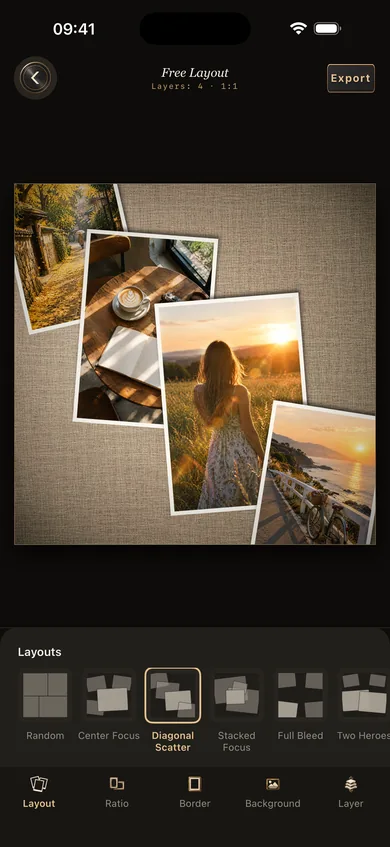
Freeform: 6 arrangements, 4 walls
Tap Free Layout on the home screen, add a few photos, open Layout and choose an arrangement:
random · center feature · diagonal scatter · overlapping focus · full-bleed overflow · two subjects
After that, drag, pinch and rotate any photo, or set its size and angle precisely under Layer.
- Ratio: 1:1, 3:4, 4:3 or 9:16.
- Background: red brick, concrete, dark wood or linen, or a solid colour.
- Border: white border and drop shadow on the prints, plus a vignette spotlight that draws the eye to the center.
Questions
Does the collage reduce image quality?
You choose the export size: original, 2048 px or 1080 px on the long edge, as high-quality JPG, standard JPG or PNG. For the most detail, pick original size with PNG or high-quality JPG.
Can I save an unfinished collage?
Yes. Grid and freeform layouts both save as drafts, which you can reopen from Recent Drafts on the home screen. Drafts are stored only on your iPhone.
Can I use filters in a collage?
Edit and export each photo in single-photo mode first, with the filter and frame you want, then add the results to a collage. See film filters.